Error Handling
Errors happen. An API you pull data from may encounter a temporary outage, or the "eventually" part of an "eventually consistent" database may need a couple more seconds to save a record. When you encounter errors, you have two tools to handle them:
- Custom integration-level error handling
- Step-level error handling
Custom integration-level error handling
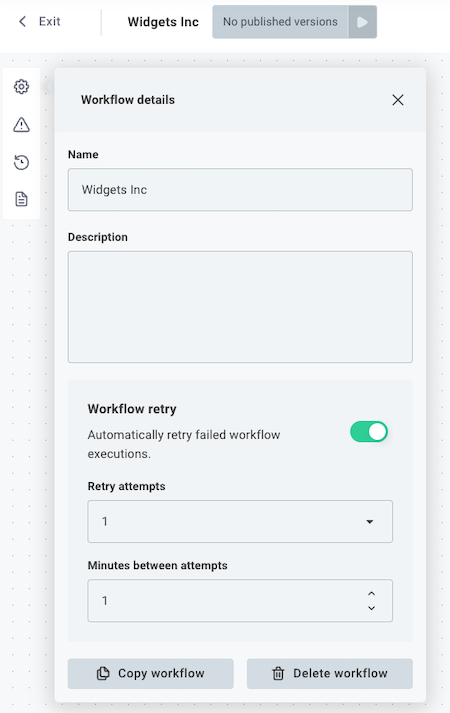
If an execution fails, you can have the runner automatically retry a few minutes later. The webhook payload you received will be passed back through your Custom integration again, and your Custom integration will start again at its first step. This is useful if your Custom integration is idempotent and you don't know which step might fail.
To configure automatic retry, select the gear icon (Custom integration Details button) on the left side of the canvas, and then select Configure Custom integration retry. You can configure your Custom integration to retry a certain number of times, waiting a specified number of minutes between retries.
Step-level error handling
You might not want your entire Custom integration to stop because one step failed, especially if you're looping over hundreds of items and one item has issues.
You can configure how the runner should handle errors on each step. To do that, click a step that you would like to configure, and then open the Error Handling tab in the step configuration drawer.
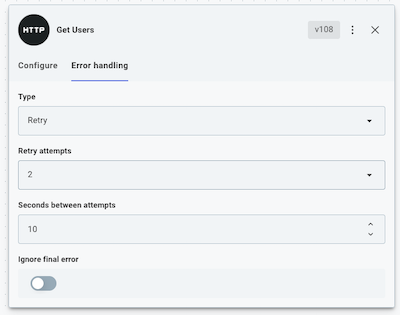
Under Error Handler Type you have three options:
- Fail - stop the Custom integration and throw an error.
- Ignore - ignore the error and continue running the remaining steps.
- Retry - wait for an amount of time (Seconds between attempts) and then try the step again, a maximum of Retry attempts times. If the last attempt still fails, either fail the Custom integration or ignore the error depending on whether Ignore Final Error is true or false.